
Last updated: May 2026 · Reviewed by: AREALTY rental team, Tokyo
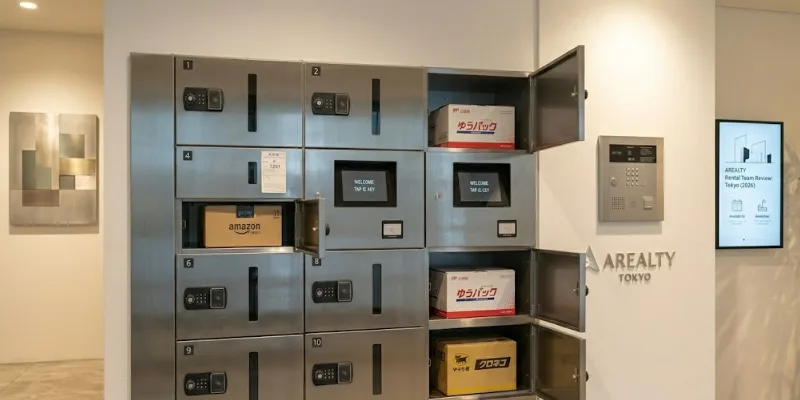
An apartment delivery box (宅配ボックス, takuhai bokkusu) is a secure locker in your building’s lobby that receives parcels when you’re out. In 2026, two systems dominate Tokyo: dial-style lockers (4-digit code written on a paper slip) and digital lockers (IC card or PIN). Picking a building that has one is the single biggest “small” amenity decision an expat can make — Japan’s redelivery rate has been a national policy issue for years, and a delivery box solves it on day one.
Why this matters before you sign a lease
If you’re moving to Tokyo, the apartment delivery box is the amenity most expats underestimate at viewing — and overspend to add later. Japan’s Ministry of Land, Infrastructure, Transport and Tourism (MLIT) has tracked redelivery rates for over a decade as part of its logistics decarbonisation push, with the policy goal of getting redelivery below 6% by FY2030. The reason MLIT cares: every missed delivery doubles the truck-kilometres for that parcel.
For you as a tenant, the math is simpler. Without a delivery box, a typical 2-hour delivery slot ties you to your apartment for two hours, twice (first attempt + redelivery). With a delivery box, those four hours come back into your week.
This guide is written for foreign residents renting in Japan — what to look for at viewings, how to actually use the locker on day one, and what to do when something goes wrong. It is not a guide to building security or auto-lock systems (we have a separate guide on auto-lock systems for rental apartments if that’s what you need).
What an apartment delivery box actually is
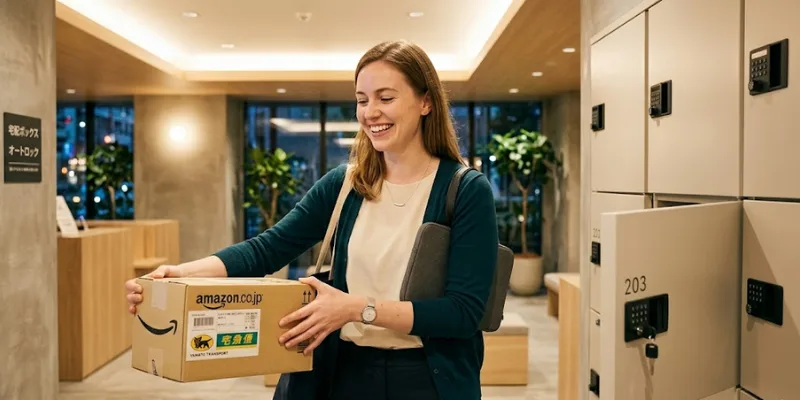
An apartment delivery box is a stack of communal lockers — usually mounted in the entrance lobby, post-room, or just inside the auto-lock door — that couriers use as a drop point when the recipient is not home. It’s a piece of building infrastructure, not a personal mailbox. Each parcel goes into a different locker each time, and you only know which locker is yours after the courier leaves a slip in your mailbox.
The key distinction every renter should understand:
- Mailbox (郵便受け, yūbinuke): personal, small, holds letters and slips.
- Apartment delivery box (宅配ボックス, takuhai bokkusu): communal, parcel-sized, assigned dynamically.
In a Japanese listing sheet, the kanji you’re looking for is 「宅配ボックス」 under the equipment/facilities section (設備). If the listing instead says 「メールボックス」, that’s the mailbox — not the same thing.
The two locker systems you’ll encounter in 2026
1. Dial (mechanical) lockers
These are still the most common system in mid-range buildings built before roughly 2015. The courier:
- Opens an empty locker.
- Places your parcel inside.
- Sets a 4-digit code on the dial before closing.
- Drops a paper slip (不在票, fuzaihyō) in your mailbox showing the locker number and the code.
Dial systems have one quirk worth knowing: some require you to push a small “release” or “open” button after entering the code, others open as soon as the last digit lines up. If the door doesn’t open on the first try, that’s almost always why.
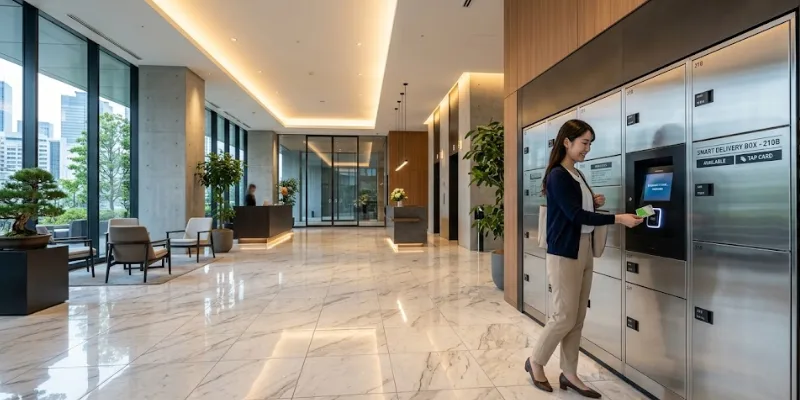
2. Digital (electronic) lockers
Standard in newer condominium-style buildings (マンション, manshon) and almost universal in buildings classified as “next-generation rental housing”. The flow is:
- Courier scans or selects your unit number on a touch panel.
- The system assigns and opens an empty locker.
- The courier drops the parcel in, the door auto-locks.
- Your unit’s intercom/interphone shows a notification light — and on smart-equipped buildings, your phone gets a push.
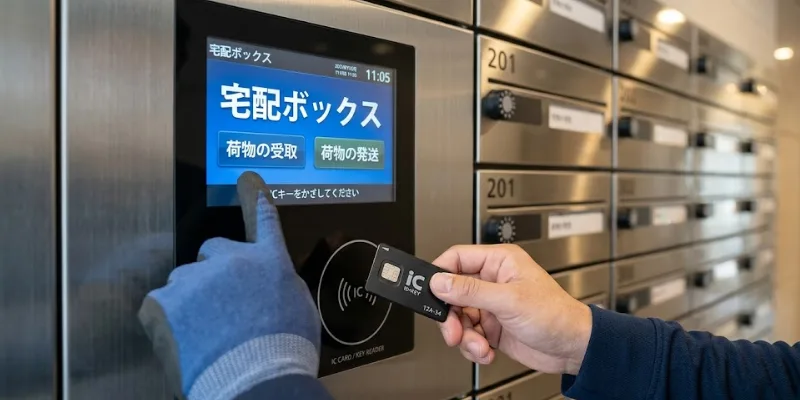
- To retrieve, you tap your IC chip key (the same one that opens the entrance) or enter your resident PIN at the panel.
Digital systems don’t use paper slips, which is more secure (no slip in the mailbox = no code visible to anyone who can reach into your post). They also handle “the locker is full” more gracefully — the panel will tell the courier to try again later instead of letting them lock the parcel into a full system.
How to use a delivery box on day one (step-by-step)
The first time you collect a parcel can be confusing because the slip is in Japanese and the locker labels are too. Here’s the script.
For a dial locker:
- Open your mailbox after coming home — look for any slip with the words 不在票 or 宅配ボックス.
- The slip has two numbers you need: the box number (BOX No. or ボックス番号) and the passcode (暗証番号, anshō bangō).
- Walk to the delivery box bank. Find the matching box number on the door.
- Turn the dial slowly to each digit. After the fourth digit, either pull the door or press the round button next to the dial.
- Take your parcel. Spin the dial before walking away — leaving the code visible is bad etiquette and a small security risk.
For a digital locker:
- Check your interphone screen — many show “宅配ボックスお預かり” (“parcel held in delivery box”) on the home screen.
- Walk to the touch panel. Tap your IC key against the reader, or press your unit number and enter your PIN.
- The screen will show your locker number and the door will pop open. Take the parcel and close the door — it auto-locks.
If your slip is in Japanese and you can’t read it, the two numbers you need are usually the only numbers on the slip that aren’t a phone number. Phone numbers are 10–11 digits with hyphens; the box number is 1–3 digits and the passcode is exactly 4 digits.
When something goes wrong
The five most common issues and what to do:
“The code on the slip doesn’t open the box.”
This is almost always a transcription error by the courier (a 6 looked like an 8 in their handwriting). Call the courier number on the slip — Yamato, Sagawa, and Japan Post all have 24-hour lines and many have English-language options. The driver can usually remember the code or come back to your building.
“All the lockers are full.”
This is the redelivery scenario the box was meant to prevent. The courier will leave a redelivery slip — schedule it through the QR code on the slip (every major courier supports online redelivery booking, mostly in English now). Going forward, clear your locker the moment you get home; sitting on a parcel for three days hogs the locker for the whole building.
“There’s no slip but my tracking says delivered.”
Check the box numbers on the lockers — couriers occasionally drop the slip into the wrong mailbox. If nothing turns up in 24 hours, contact the courier with the tracking number, not the building management. The courier has GPS-stamped delivery logs.
“The locker shows a parcel but I never ordered anything.”
It happens — wrong unit number entered. Don’t open it (you don’t have the code anyway for a dial system). Tell building management; they’ll contact the courier.
“It’s a refrigerated/frozen item.”
Most apartment delivery boxes are room-temperature only. A small but growing number of new buildings have a separate refrigerated locker (冷蔵 reizō) — if you order from Oisix, Pal System, or similar, ask at the viewing whether the building supports cold deliveries. Default behaviour for cold parcels: courier will not put them in a standard locker and will leave a redelivery slip instead.
What you can’t (and shouldn’t) put in one
This list applies whether you’re a recipient or a sender using the locker for outbound pickup:
- Perishables unless the building has a cold locker (see above).
- Cash, valuables, or original documents — most courier terms specifically exclude these from delivery-box drops anyway.
- Items requiring a signature or ID check — Hanko-stamped contracts, registered mail (書留, kakitome), and most COD parcels will not be left in the box; the courier must hand them to you.
- Anything bigger than the locker — most lockers cap around 60cm × 50cm × 50cm. Furniture, large appliances, and bulk water cases will trigger a redelivery, not a locker drop.
If you’re expecting any of the above, plan to be home or use the courier’s own pickup-point service (Yamato’s Kuroneko Members, Sagawa’s locker network, Japan Post’s Yū-Pack counters at convenience stores).
Checking for a delivery box at a viewing
This is the part most expats skip and later regret. When you visit an apartment with an agent, do four things in the lobby before you even go upstairs:
- Find the locker bank. Count the number of lockers and divide by the number of units in the building (usually printed on a fire-evacuation map by the door). If the ratio is below ~1 locker per 4 units, the system will be congested. Buildings with 1 locker per 1–2 units are the gold standard.
- Check the system type. Digital is preferred — newer buildings, smarter notifications, and no slip-in-mailbox security gap.
- Ask if there’s a cold locker if you order groceries online.
- Ask whether it’s free. In a small handful of buildings, especially serviced apartments, locker use is metered or has a small monthly fee. This should be in the lease (重要事項説明書, jūyō jikō setsumeisho) — don’t skip that document.
If you’re working with an agent, “宅配ボックスは使えますか?” (“Is there a delivery box I can use?”) is the single most useful Japanese sentence you can memorize for property viewings. For a more complete viewing checklist, see our guide on questions to ask a real estate agent in Japan.
How to find apartments with delivery boxes
Almost all RC (reinforced concrete) “mansion” buildings built after about 2010 include a delivery box. The amenity is far less common in:
- Wooden-frame apartments (木造, mokuzō) — see our wood-frame construction guide for the trade-offs.
- Older steel-frame buildings without a renovation.
- Sub-25m² studios where lobby space couldn’t accommodate the bank.
If a delivery box is non-negotiable for you, filter for RC/SRC construction + post-2015 build year — that combination delivers a delivery box in roughly 9 out of 10 listings. Listings on AREALTY’s English site let you filter on construction type and equipment directly, and our team can pre-screen properties so every shortlist you see already has a working delivery box.
Frequently asked questions
Do all Tokyo apartments have a delivery box? No. The amenity is concentrated in mid-rise and high-rise concrete buildings. Older wooden apartments and small studios often don’t have one. Always confirm at the viewing — don’t assume.
Can I receive Amazon, Rakuten, and Mercari parcels in the locker? Yes for the vast majority of orders. Amazon Japan especially defaults to delivery-box drop-off when the locker is available. The exceptions are signature-required items and oversized parcels.
What happens if I leave my parcel in the locker for a week? Building rules vary, but most management companies will send a notice (a printed paper on your door) after 3–5 days asking you to clear it. Repeated long holds can lead to the parcel being moved to the management office or, rarely, returned.
Can I use the locker to send things out? Some buildings support outbound use — you place a labelled parcel in a designated locker for the courier to collect on their next round. This is more common in newer Yamato-partner buildings. Check the panel or ask management.
Is the delivery box covered by my renter’s insurance? Read your policy. Tenant insurance in Japan (家財保険, kazai hoken) typically covers theft from inside your unit but coverage of communal areas including the delivery box varies. If high-value parcels are a concern, opt for in-person delivery for those.
What’s the difference between a delivery box and an auto-lock entrance? They’re separate building features. A delivery box receives parcels; auto-lock controls the entrance door. Most modern buildings have both — for the second one, see our auto-lock apartment guide.
A short Japanese vocabulary cheat sheet
These are the terms you’ll see on signage, slips, and listing sheets:
- 宅配ボックス (takuhai bokkusu) — delivery box
- 不在票 (fuzaihyō) — non-delivery / absence slip
- 暗証番号 (anshō bangō) — passcode / PIN
- 再配達 (sai-haitatsu) — redelivery
- 設備 (setsubi) — equipment / facilities (the listing section)
- 冷蔵 (reizō) — refrigerated
For the wider apartment-hunting vocabulary set, our Japanese apartment vocabulary glossary covers contracts, layouts, and amenities.
Talk to AREALTY
If a delivery box is on your must-have list, tell us at the start of your search. We’ll filter it into your shortlist before you book viewings, so you don’t waste a Saturday on apartments that don’t have one. Our team works with foreign residents across Tokyo — from first-time renters to families relocating from abroad — and we handle the delivery-box-and-amenity check at the same time we screen for English-friendly landlords and guarantor flexibility.
Browse foreigner-friendly apartments in Tokyo → Read our 2026 Tokyo apartment hunting checklist →
Sources & references
- Ministry of Land, Infrastructure, Transport and Tourism (MLIT), redelivery reduction policy materials, 2024–2026 updates: https://www.mlit.go.jp/
- Yamato Transport (ヤマト運輸) delivery-box handling guidelines: https://www.kuronekoyamato.co.jp/
- Sagawa Express (佐川急便) absence-slip and locker procedures: https://www2.sagawa-exp.co.jp/
- Japan Post (日本郵便) parcel delivery guidance: https://www.post.japanpost.jp/
This article reflects practices observed at residential buildings across Tokyo’s 23 wards as of May 2026 and reviewed by AREALTY’s licensed rental team. If you spot something out of date, let us know — we revise these guides every six months.

Real estate advisor at Arealty Japan, specialising in helping foreign residents navigate the Tokyo and Osaka rental markets. Lucy has guided hundreds of international renters — from Working Holiday visa holders to corporate relocations — through Japan’s apartment application process. Her writing draws on firsthand experience with landlord screening, guarantor companies, and foreigner-friendly listings across all 23 Tokyo wards and major Kansai cities.